Retro TV Mockup
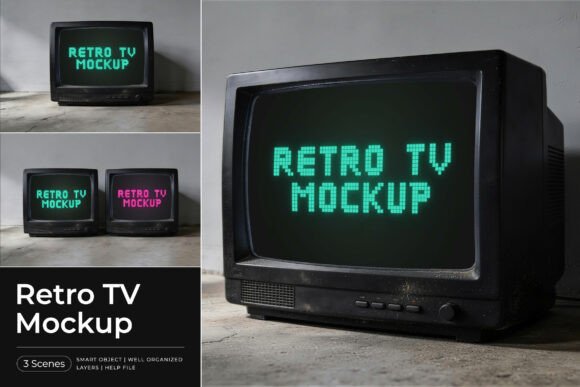
There is a distinct charm in the analog era that digital design often struggles to replicate authentically. If you are looking to evoke nostalgia, create a vintage aesthetic, or simply add a layer of tactile realism to your digital projects, the Retro TV Mockup offers a compelling solution. This tool allows designers, marketers, and hobbyists to place their content into a realistic vintage CRT television set within a moody interior scene. However, simply downloading a mockup file does not guarantee professional results. Many creators overlook critical details regarding resolution, layer organization, and lighting integration, leading to designs that look flat or unconvincing.
To help you avoid common pitfalls and maximize the potential of this asset, it is essential to understand not just how to use the Retro TV Mockup, but how to integrate it effectively into your workflow. Whether you are showcasing pixel typography, logo animations, retro branding, or promotional graphics, the difference between a mediocre presentation and a cinematic experience lies in the details.
Understanding the Value of Realistic Textures
The primary appeal of this specific mockup lies in its attention to atmospheric detail. Unlike generic screen templates that offer a clean, white background, this Retro TV Mockup places the television in a context—a moody interior scene complete with subtle dust effects and realistic screen glow. These elements are crucial for grounding your design in reality. When viewers see a design on a screen that lacks environmental interaction, such as light spill or texture reflection, the image feels artificial.
A common mistake beginners make is assuming that any PSD file will yield the same result. They often ignore the importance of the surrounding environment. By using a mockup that includes these textured backgrounds, you immediately elevate the perceived quality of your work. The authentic old-school atmosphere provided by this template helps communicate a sense of history and warmth that plain screens cannot achieve. For brands aiming to leverage nostalgia, this contextual realism is not just a nice-to-have; it is a fundamental component of effective visual communication.
Technical Requirements and Common Missteps
While the concept of using a mockup is straightforward, the execution requires technical precision. The Retro TV Mockup comes as a 300 DPI file in PSD format, which is standard for high-quality print and web presentations. However, several factors can compromise the final output if not managed correctly.
Resolution Mismatch
One of the most frequent errors is inserting low-resolution source images into a high-resolution smart object. Because the mockup is designed at 300 DPI, it expects high-fidelity input. If you drag a small, compressed JPEG from a social media post into the smart object layer, the resulting image may appear pixelated or blurry when viewed at full size. Always ensure your source artwork matches or exceeds the dimensions required by the smart object to maintain crisp edges and vibrant colors.
Ignoring Smart Object Protocols
The efficiency of this tool relies entirely on the Smart Object feature in Adobe Photoshop. A prevalent misunderstanding among novice users is attempting to edit the pixels directly on the main canvas. This approach destroys the non-destructive editing capabilities of the file. Instead, you must double-click the Smart Object layer thumbnail to open the embedded file. After inserting your design and saving the changes, your artwork will appear instantly across the mockup items. Skipping this step can lead to distorted perspectives and misaligned content.
Overlooking Layer Organization
This mockup features well-organized and fully editable layers. Neglecting to explore these layers means missing out on customization opportunities. You might find adjustment layers for color grading, shadow overlays, or screen glare effects that can be toggled on or off. Failing to review these components limits your ability to tailor the mockup to your specific lighting conditions or brand palette.
Best Practices for Integration
To get the most out of the Retro TV Mockup, adopt a methodical approach to your design process. Start by planning your content with the screen’s aspect ratio in mind. Vintage CRT televisions often have a 4:3 aspect ratio, which differs significantly from modern widescreen formats. Designing for this constraint ensures your content fits naturally without awkward cropping or stretching.
Consider the type of content you are presenting. Pixel typography and retro branding benefit immensely from the slight curvature and scanline effects often associated with CRT displays. If you are promoting a digital art piece, think about how the "screen glow" interacts with your color scheme. Warm tones might enhance the nostalgic vibe, while cool tones could create a more futuristic, cyberpunk aesthetic. Experimenting with these variables can transform a simple product shot into a narrative-driven image.
Furthermore, utilize the included help file. While the interface is intuitive, specific instructions can save time and prevent frustration. The help documentation often contains tips on resolving common issues, such as layer conflicts or export settings. Taking five minutes to read through these guidelines can streamline your workflow and ensure consistency across multiple variations of your design.
Evaluating Before You Commit
Before integrating this mockup into your commercial projects, verify that it meets your specific needs. Check the following criteria:
- File Compatibility: Ensure your version of Adobe Photoshop supports the features used in the PSD file, particularly if you are using an older version.
- License Terms: Review the usage rights carefully. Some mockups restrict commercial use or require attribution. Understanding these terms protects you from legal complications down the line.
- Customizability: Test the ease of replacement. Open the file and try swapping out a few elements to gauge how responsive the smart objects are. A sluggish file can hinder productivity during tight deadlines.
- Visual Consistency: Assess whether the moody interior scene aligns with your brand identity. If your brand is minimalist and bright, a dark, dusty room might clash with your overall aesthetic unless edited extensively.
It is also important to note that model images and photographs are for presentation purposes only and are not included in the item. This means you are purchasing the structure and the template, not the pre-rendered scenes. This distinction is vital for budgeting and planning. You will need to allocate time for any additional compositing or background adjustments required to fit your specific vision.
Conclusion
The Retro TV Mockup is a powerful tool for anyone seeking to inject nostalgia and authenticity into their visual storytelling. By avoiding common technical errors, respecting the file’s structure, and thoughtfully considering the context of your design, you can produce results that resonate with audiences aged 20–50 who appreciate both modern convenience and classic charm. Take the time to master the smart object workflow, respect resolution limits, and explore the layered options available. Doing so will not only enhance the quality of your presentations but also save valuable time in the long run. With the right approach, this mockup becomes more than just a template; it becomes a bridge between past aesthetics and contemporary design goals.